230K downloads on a Nobel Prize study hack, a mascot that sells 50% off on every screen, and the 1-screen onboarding leaking its 10x
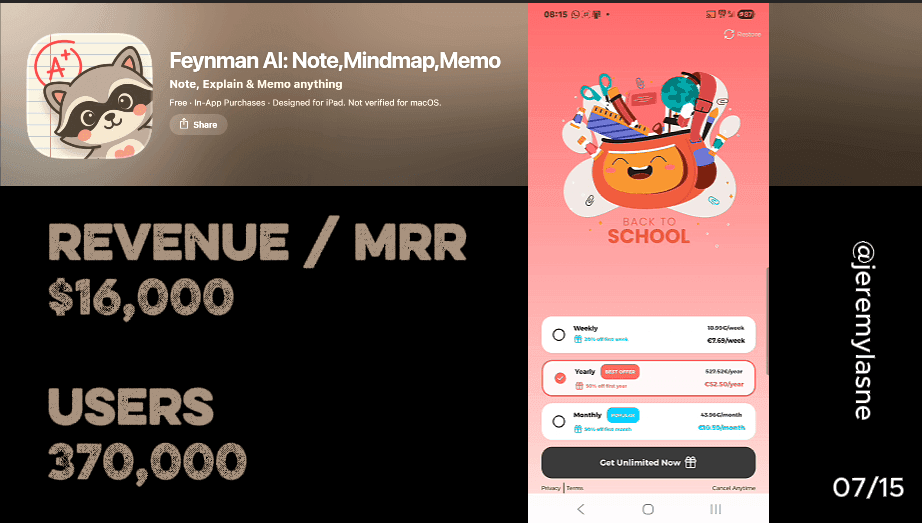
Nguyen Thanh Duy (@alexcooldev) built a study app on a Nobel Prize physicist's brain hack. 230K+ downloads on Android, 580 a day, a 4.43-star rating across 4,000+ reviews. The USP is real: the Feynman Test asks you to explain a concept back and grades your understanding, closing the comprehension loop that Coconote, Turbolearn, and Quizlet leave open. The product has personality: per-note chatbots grounded in your own uploads, auto mind maps, a living mascot, 3D buttons, everything moves. The model is freemium -- use it until the note limit, then a 3D animated backpack delivers 50% off on every screen. The settings page leads with a rating ask and a share button. The onboarding is one screen: account creation. Flo runs 43, Fabulous 37, Feynman AI runs 1. The idea is brilliant, the AI wrapper is nailed, and the distribution is let the product speak and interrupt with a discount until someone pays. There is a version of this app that does 10x with the same product. It starts with giving the Feynman technique the onboarding it deserves.
The Numbers
- Downloads: 230K+ on Android alone, plus additional iOS installs
- Daily downloads: ~580/day on Android
- Rating: 4.43 / 5 across 4,000+ reviews
- Developer: Nguyen Thanh Duy, a solo indie developer (@alexcooldev on X)
- Launched: late 2024; major 2.0 update in 2025 (redesigned UI, new mascot, the Feynman Test)
- Pricing: Weekly EUR 7.69 (30% off), Monthly EUR 10.50 (50% off), Yearly EUR 52.50 (50% off)
- Model: freemium with a note limit, then the paywall
- Onboarding screens: 1 (account creation)
- Inputs: YouTube URLs, audio recordings, PDFs, photos of handwritten notes, direct text
The USP: A Notebook, But Science-Backed
Most AI note apps do the same thing with a different face. Record a lecture, generate a summary, read it back later. The core loop is capture then retrieve. That is useful, and it is also what ten other apps do.
Feynman AI's USP is one layer deeper: it closes the comprehension loop that every other note app leaves open. Richard Feynman won the Nobel Prize in Physics in 1965 and was one of the most remarkable teachers who ever lived, someone who believed that if you could not explain something simply, you did not understand it yet. His method: explain the concept as if teaching someone who knows nothing, find where the explanation breaks down, go back and fill the gap.
@alexcooldev made this the core mechanic. You upload a lecture, PDF, or YouTube video. The AI generates notes, mind maps, and quizzes. Then the app asks whether you can actually explain it back, and evaluates whether your explanation is correct. That specific loop is what separates Feynman AI from Coconote, Turbolearn, and Quizlet. They help you capture and review. Feynman AI helps you verify understanding. That is not a feature difference, it is a category difference, and 230K+ downloads later the audience clearly feels it.
The Name: Borrowed Authority at Zero Cost
Naming the app "Feynman AI" is one of the smartest brand decisions in the indie app space. Richard Feynman is not a trademarked product. He is a historical figure whose name is synonymous with brilliant, clear thinking, and students who have met his name in any science class already carry a positive association.
The name does three things at once. It signals that the app is built on a real scientific principle, not a marketing concept. It associates the product with one of the most beloved scientists in popular culture. And it positions the app as being about genuine understanding, not just note-taking efficiency. Most indie apps fight to build trust from zero because their name communicates nothing. "Feynman AI" communicates the method, the science, and that it is AI-powered, all in two words, no tagline needed.
The Design: Living Characters, 3D Buttons, Everything Moves
The mascot is not brand decoration. It is a living character with animated emoji energy. The backpack bounces, the 3D buttons have depth and press response, and when the paywall pop-up appears it does not arrive as a static banner -- the mascot delivers it. Every interactive element has personality.
Most study and productivity apps lean clinical: white backgrounds, system fonts, nothing moving unless necessary. That aesthetic says "serious tool for serious work." Feynman AI says learning should feel alive. The 2.0 changelog is explicit about it: "We adopted a new mascot (yes, it's cuter). Extra smooth animations (buttery vibes only)." That is a developer who knows the character is the emotional identity of the product, not an optional flourish.
For a student audience that spends hours on TikTok before opening a textbook, an app that feels boring is an app that gets closed. The kinetic design is a retention decision as much as an aesthetic one. The AI wrapper is nailed here: the underlying technology is solid, and the character layer is what makes it feel like a product rather than an API call wrapped in a UI.
The In-App Experience: What Students Actually Get
Per-note chatbots grounded in your own uploads
Every note created in Feynman AI comes with its own chatbot. Not a general assistant in a different tab -- a chatbot that knows your specific note, answers questions about it, and highlights the relevant section when you ask.
This is a genuinely thoughtful product decision. A student who does not understand something in their lecture notes can ask the chatbot, and the answers are grounded in their own content rather than generic internet knowledge. The response quality is tied to the quality of the source material they uploaded, which keeps the tool honest.
Automatic mind maps from unstructured content
From any note, Feynman AI generates a visual mind map. Concepts become nodes, relationships become branches, and the structure of the content becomes visible in a format some learners retain better than linear text.
Mind maps in most apps are either manual or template-based. Feynman AI generates them dynamically from unstructured content -- a YouTube lecture, a voice recording of a class -- so the structure it produces reflects the actual architecture of the ideas in the source, not a preset shape.
The Feynman Test: the core differentiator
This is the feature the name promises. After generating notes, the app tests whether you actually understood them. It asks you to explain key concepts back, in simple terms, as if teaching someone else. The AI evaluates the explanation: does it capture the core idea, is it clear, what did you miss? The gap between what you explained and what the content contains is the gap in your understanding.
A student who studied for three hours and can pass a multiple-choice quiz might still fail the Feynman Test, because multiple choice tests recognition memory and the Feynman Test tests comprehension. That difference is the whole product.
What breaks: the voice pipeline
The Feynman Test occasionally fails to process voice recordings, documented across multiple reviews. The error appears regardless of speaking pace, mic distance, or enunciation. This is the most critical bug in the product, because the Feynman Test is the core feature the name promises. When it does not work, the user paid for something that is not delivering the thing they paid for.
The reviews that dock stars are almost universally about this: the concept is brilliant, the execution breaks at the most important moment. Fixing the voice-processing pipeline is the highest-priority product fix before any conversion optimization.
The Content It Ingests
The breadth of input types is competitive with much larger apps, and the fact that one developer built all of it is the part that should surprise people. Feynman AI accepts:
- YouTube videos (paste a URL, get the transcript and notes)
- Audio recordings (lecture recordings, voice memos, WhatsApp recordings)
- PDFs (upload and summarize)
- Photos of handwritten notes or homework problems
- Direct text input
The Distribution Strategy: Let the Product Speak, Interrupt With a Discount
That is not a critique, it is a description of what is happening, and it is working at 230K+ downloads. Cross-platform sync means notes made on mobile are available on the web version, which is the practical feature that makes the tool usable in a real study workflow rather than a demo.
Freemium: use it, hit the limit, meet the paywall
Feynman AI is free to download with a note limit. Use it, create notes, hit the cap, encounter the paywall. The bet is that the product delivers enough value before the limit that the user wants to keep going. The model is correct for students: they are price-sensitive and skeptical of subscription apps they have not experienced, so giving them real utility before asking for money is right.
The open question is timing. Does the aha moment -- the Feynman Test working, the mind map clicking, the per-note chatbot answering something that would have taken 20 minutes of re-reading -- arrive before the note limit does?
The paywall: a mascot delivers 50% off on every screen
The delivery mechanism is the mascot -- backpack bouncing, emoji alive -- appearing with a 50% off pop-up on every screen in the app. The paywall itself is genuinely sophisticated: three tiers (Weekly EUR 7.69 at 30% off, Monthly EUR 10.50 at 50% off, Yearly EUR 52.50 at 50% off), gift-ribbon icons, color-coded "BEST OFFER" and "POPULAR" labels, a clean visual hierarchy. Weekly works for one exam season, monthly for semester-by-semester, yearly for the committed learner. Three real use cases, three real tiers.
The frequency is the only thing working against it. At that exposure level, the mascot that should be building emotional connection gets associated with interruption instead. The character is doing paywall duty on every screen before the onboarding has taught the user why the product is worth it.
Settings used as a growth surface
The settings page leads with "Rate us 5 stars" and "Share Feynman AI," right at the top, not buried. @alexcooldev understands that reviews and sharing are compounding growth levers that cost nothing. Putting them inside the product rather than hoping they happen organically is the right instinct, and the placement reaches the users who engage enough to open settings -- a self-selected group of the most interested users. That is not the worst place to ask.
The Onboarding: 1 Screen. That's It.
Flo runs 43 screens. Fabulous runs 37. Prayer Lock runs 36. Feynman AI runs 1. The account is mandatory, which is defensible -- cross-platform sync and note storage need an identity. What is missing is the handful of screens between "create account" and "here is the app." Those screens do not need to be Flo. They need to do five things:
- Ask what subject and level the user is studying, so the experience feels relevant
- Explain the Feynman technique in 30 seconds, animated -- the concept the name promises and the user probably does not know yet
- Show a projection tied to an exam date the user sets: "Students using Feynman AI 3x a week process 30+ hours of study material before their next exam"
- Guide the user through generating their first note, right now, inside onboarding -- the aha moment before the paywall
- Ask for the review right after the first note generates, while the student is thinking "this is actually good"
What's Next: Three Unlocks Sitting Right There
The family plan
A family plan at EUR 79.99/year for 2 to 4 learners reframes the purchase decision. The student who balks at EUR 52.50/year for themselves is one person; the parent paying for tutors, revision guides, and online courses at EUR 79.99/year for the whole family is a different conversation. Duolingo's family plan is a significant revenue contributor for exactly this reason, and Feynman AI's demographic -- students -- is precisely the one where parents often control the subscription budget.
Student verification pricing
Every review that mentions price calls it too much for students. A verified student discount at EUR 29.99/year with an .edu email or student ID removes the objection from the demographic that forms the entire user base. The users who would pay EUR 29.99 and would not pay EUR 52.50 are the majority of the people using the free tier. Capturing them at a lower price is better than not capturing them at all.
The Feynman Test has to work
Before any conversion optimization: fix the voice processing. The feature the app is named for, that the mascot promotes, that the paywall is selling -- it needs to work every time, not most of the time. A student who paid for a week of premium to study for an exam and cannot use the core feature is not a churned user. They are a negative review, a cancelled subscription, and an acquisition cost that produced no LTV.
The Honest Assessment
The idea is brilliant, the design has personality, and the AI wrapper is nailed. @alexcooldev did the thing most indie developers do not: he found a real scientific method, built a product that genuinely implements it, gave it a name that carries instant authority, and shipped it. The per-note chatbot is a thoughtful UX decision, the mind map generation is useful, the mascot has real design energy, and the product works well enough that students report real grade improvements.
The distribution strategy is what it is: let the product speak, and interrupt the user with a discount until someone pays. It produced 230K downloads and it will keep producing them. But there is a version of this app that does 10x that with the same product. It is not a different product. It is the same product with the onboarding screens that currently do not exist. The Feynman technique says you only understand something when you can teach it clearly. The onboarding should teach the user what Feynman AI is before it asks them to pay for it. The Feynman technique deserves a Feynman onboarding. If you want to know which screen in your own funnel is doing that teaching -- and which one is sending the user to a paywall unprepared -- tasu maps exactly that, ranked by dollar impact.
FAQ
What is Feynman AI?
Feynman AI is an AI-powered study tool that applies the Feynman learning technique to help students understand and retain content. It converts recordings, PDFs, YouTube videos, and notes into summaries, mind maps, quizzes, and per-note chatbots, then tests comprehension through the Feynman Test, which asks the user to explain concepts back in simple terms and grades the explanation.
Who built Feynman AI?
Feynman AI was built by Nguyen Thanh Duy, a solo indie developer known as @alexcooldev on X. The app launched in late 2024 and received a major 2.0 update in 2025 with a redesigned UI, a new mascot, smoother animations, and the Feynman Test feature.
What is the Feynman technique?
The Feynman technique is a learning method associated with physicist Richard Feynman. It holds that genuine understanding is demonstrated by explaining a concept simply, as if teaching someone with no background in the subject. Where the explanation breaks down, the understanding has a gap. It is one of the most evidence-backed study strategies in cognitive science.
How many downloads does Feynman AI have?
Feynman AI has 230K+ downloads on Android alone, plus additional iOS installs. It averages about 580 downloads a day on Android and holds a 4.43 / 5 rating across 4,000+ reviews.
What does Feynman AI cost?
Feynman AI offers weekly (EUR 7.69, 30% off), monthly (EUR 10.50, 50% off), and yearly (EUR 52.50, 50% off) subscription plans, with a freemium tier limited by a note cap available at no cost. Every review that mentions price calls it high for students, which is the case for a verified student discount and a family plan.
What makes Feynman AI different from other AI note apps?
Most AI note apps focus on capture and review: they turn content into notes and let you re-read them. Feynman AI adds a comprehension-verification layer, the Feynman Test, that asks the user to explain concepts back and evaluates whether the explanation reflects genuine understanding. This closes the feedback loop that Coconote, Turbolearn, and Quizlet leave open.
This teardown is part of an ongoing series on in-app optimization. Want answers like these while you build? The tasu MCP serves the same sourced benchmarks to your coding agent, for onboarding, paywalls, and pricing.