10M installs, $10/year, and the price that caps revenue more than any onboarding flaw
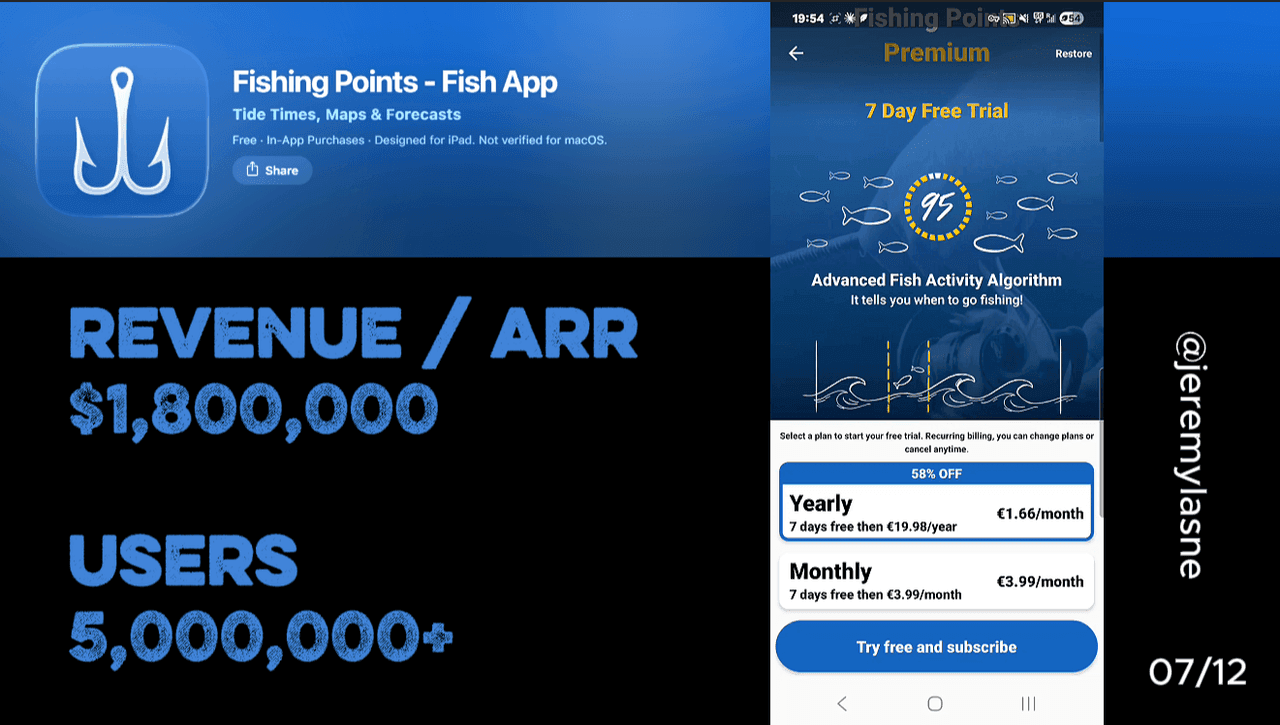
Fishing Points is a GPS fishing tool with 10M+ installs, nautical charts, solunar tables, tide forecasts, and weather data. Their onboarding runs 11 screens with skippable account creation, light personalization, an animated loading screen, and a well-constructed sliding paywall with a 7-day free trial and 58% off the annual plan. Notification permission is asked after entry. The product is genuinely excellent. Users love it. The price is $10/year. That single decision caps the revenue ceiling more than any onboarding flaw. This teardown is as much about pricing psychology as it is about conversion architecture.
The Numbers
- Total installs: 10M+
- Annual plan: ~$10/year (~$0.83/month)
- Monthly plan: shown with 58% off annual framing
- Free trial: 7 days on both plans
- App Store rating: 4.7+ / 5
- Premium: solunar tables, tide forecasts up to 3 months ahead, unlimited waypoints, worldwide nautical charts, fish activity forecasts
- Onboarding screens: 11
- Comparable competitor pricing: $8/month ($96/year)
- Fishing app market: $220M in 2026, $590M by 2035
- Developer: Fishing Points d.o.o. (Slovenia)
The Niche That Earns Every Conversion It Gets
Fishing is not a casual hobby. It is a religion for the people who practice it. The angler who downloads Fishing Points is not sampling a new app category out of curiosity. They drove two hours to a lake at 4am last weekend. They have a tackle box organized by species and season. They know the difference between spring and neap tides. They will happily discuss solunar theory with a stranger for forty-five minutes.
This is the most intrinsically motivated user base in this teardown series. Not the sleep-deprived parent who needs Huckleberry. Not the language learner who downloaded SuperChinese on an impulse. A person who fishes seriously and finds an app that does GPS waypoints, tide forecasts, and solunar tables in one place has found something they have been looking for. The conversion pressure on the paywall should be minimal -- the motivation is already at maximum.
The fishing app market is valued at $220 million globally in 2026, growing to $590 million by 2035. North America accounts for 46% of global downloads. The top five apps hold 67% of the total user base. Fishing Points, with 10M installs, is almost certainly inside that top five.
The product is there. The users are there. The price is the variable that decides how much this converts to.
The Full Fishing Points Onboarding Breakdown
Account creation: skippable, correctly so
Fishing Points opens with an account creation prompt. Unlike Huckleberry's mandatory wall, this one is skippable. The user can continue as a guest and encounter the product before committing to registration.
This is the right decision for the fishing user demographic. The median age skews older than most app categories -- recreational fishing in the US is dominated by adults over 35. This is a user who is more likely to be skeptical of account creation, more likely to have experienced apps that disappeared after collecting their email, and more likely to bounce at an unexpected sign-up wall before seeing any value.
Skippable account creation with a post-value sign-up hook -- "create an account to save your fishing spots" -- is the correct architecture for this demographic. Fishing Points gets this right at the start.
Personalization: light, functional, correct for the context
The personalization questions are brief and targeted. What do you fish for? Saltwater or freshwater? Where do you primarily fish? What are you looking to track?
This is not 60 screens of emotional investment. It is not a projection graph or a before/after transformation screen. It is four questions that configure the app correctly for the user's actual use case -- the difference between an angler who needs offshore nautical charts and one who needs inland lake maps is significant.
The brevity is appropriate. The Fishing Points user is not here to explore the app emotionally. They are here to find their fishing spots and know when the fish will bite. Long onboarding in this context would not build investment. It would build impatience. The personalization collects what matters, nothing more.
One optimization: the loading screen that follows personalization could surface what the answers produced. "Based on your location and target species, we're loading the best tide windows and fish activity forecasts for your area" is more compelling than a generic processing animation. It shows the user their data was used, not just collected.
The loading screen: process theatre done correctly
After personalization, Fishing Points shows a loading screen. "Processing your data." Animated progress. A sense that something real is being computed from the answers provided.
This is process theatre -- the screen is not showing real computation, it is creating the perception of it -- but it is executed well for the context. A fishing app user who answered questions about their species preferences and fishing location expects those answers to produce something specific. The loading screen bridges the gap between "I answered questions" and "here is my personalized experience."
The psychological function is identical to every other plan-building loading screen in the series: Flo's ISO certification display, SuperChinese's plan generation, Cal AI's animated projection. The difference is that Fishing Points uses the moment for product transition rather than for trust signal delivery. There is an opportunity here: the loading screen could show the first solunar forecast for the user's area, the next high-tide window, or the best fishing time tomorrow. Real data, delivered during a moment that is already framed as "we're computing something for you." That is a product demo that costs nothing to add.
The paywall: well-constructed, well-animated, fundamentally underpriced
The paywall shows yearly and monthly options. Both carry a 7-day free trial. The annual plan is displayed with a sliding animation that transitions from the monthly price to the annual per-month equivalent, landing on "58% off." The animation is clean and attention-directing -- it moves the eye to the discount without relying on a static text label.
The 7-day free trial on both plans is the correct structure for the fishing user who may be seasonal. A fisherman who downloads the app in December might not be actively fishing. A 7-day trial that starts immediately wastes on non-fishing days. The free trial mechanic is correct; the timing of when the app is recommended for trial is the optimization.
The paywall is skippable. The user who skips enters the app with limited functionality. This is fine. The free tier of Fishing Points is genuinely useful for basic navigation and location saving. The premium features -- 3-month tide forecasts, advanced solunar tables, unlimited waypoints, full nautical chart access -- are the features that matter on a serious fishing trip. The user who goes on one serious fishing trip without premium access will understand what they are missing. The paywall converts on the next session.
The 58% off animation is the best single paywall visual in this series for pure attention direction. Where most apps use a crossed-out price (static) or a countdown timer (anxiety), Fishing Points uses motion to take the user's eye on a journey from "this is what monthly costs" to "this is how much less you pay annually." The slide is the sale.
Now the pricing problem.
The annual plan costs approximately $10/year. Users explicitly note that other fishing apps charge $8/month. The Fishing Points user who wrote "the price for premium is very very reasonable at $5 or $10 a year" is describing a product they love and would pay more for. They are not asking for a discount. They are expressing surprise at how cheap it is.
That surprise is not a compliment. It is a price signal. When users are surprised by how cheap your product is, you have not found the price ceiling. You have set a price floor that the market never asked for.
The comparable competitor charges $8/month, or $96/year. Fishing Points charges $10/year. That is a 90% price gap for a product users describe as better than the alternative. The revenue implication is direct: at $39.99/year -- still 58% cheaper than the competition on an annual basis -- Fishing Points quadruples its revenue per paying user without changing a single screen, adding a single feature, or acquiring a single new user.
Notification permission after entry: late but functional
Fishing Points asks for notification permission after the user has entered the app. Not mid-onboarding. Not tied to a commitment frame. Just a standard permission prompt after the user has seen the product.
This is the least optimized notification ask in the series from a conversion standpoint. The user has no active relationship with the app yet, no specific feature that notifications would protect or enhance in their mind. The ask is generic.
The fix is contextual timing: ask for notification permission the first time the user saves a waypoint or checks a tide forecast -- "do you want us to remind you when conditions improve at this spot?" That question arrives in a context where the user has just demonstrated they care about a specific location and a specific condition. The yes rate on a contextual notification ask is significantly higher than on a post-entry generic prompt.
The Niche Advantage: Why This Works Despite the Thin Onboarding
Every other case in this series where the onboarding is thin -- Daylio's 11 screens, Rock Identifier's cinematic 12 -- works because something compensates for the brevity. Daylio compensates with radical privacy and a three-tier paywall architecture. Rock Identifier compensates with a cinematic onboarding that sustains the arrival motivation.
Fishing Points compensates with something rarer: a user who arrived already converted.
The person who downloads a fishing GPS app has a specific need, a specific trip planned or recently completed, and a specific feature gap they have been experiencing with their current tools. They are not casually curious. They are actively looking for a solution to a problem they have felt on the water.
For this user type, 11 screens of onboarding is not a weakness. It is a feature. Getting out of the way and letting them access the GPS, the tides, and the solunar calendar is the correct product decision. The conversion problem is not that the onboarding is too short to build investment. The investment was built before the download. The problem is that the price undervalues what that investment is worth.
What Would $39.99/Year Actually Do
The math is straightforward. Fishing Points at $10/year, with 10M installs and an unknown conversion rate, generates a revenue floor that a 4x price increase would transform without a single new install.
If 2% of 10M installs are paying users -- 200,000 subscribers, consistent with hard paywall conversion rates in a category with strong free tier utility -- at $10/year that is $2M in annual revenue. At $39.99/year, the same 200,000 subscribers generate $8M. The conversion rate would not drop 1:1 with a price increase: at $39.99/year Fishing Points is still dramatically cheaper than the $96/year competitor that users explicitly compare it to favorably.
The real scenario is that some users who pay $10 will not pay $39.99. But the majority will, because the comparison they make is not "is $39.99 cheap?" The comparison they make is "$8/month is $96/year. This is $39.99/year. This is the better deal." Users who already think $10 is surprisingly cheap will also think $39.99 is surprisingly cheap.
The pricing is not a conversion architecture decision. It is a founder psychology decision. The app was priced to be accessible, to democratize fishing data, to undercut the competition. Those are good motivations. The cost is leaving 75-80% of the potential revenue from every existing paying user uncaptured.
What To Fix, In Order
Five moves, highest revenue first:
- Raise the annual price to $39.99/year. This is the single highest-revenue action available to Fishing Points and it requires zero product development. The existing user base will pay it. The comparison to $96/year competitors makes it an easy yes.
- Move notification permission to the first waypoint save. "Do you want us to remind you when conditions improve at this spot?" converts better than a generic post-entry prompt because it arrives at a moment of demonstrated intent.
- Use the loading screen for real data delivery. Show the next high-tide window, the solunar peak for tomorrow, or the current fish activity score for the user's location during the "processing" animation. Real data during a moment framed as computation is a product demo that builds immediate value before the paywall.
- Add a post-skip conversion screen. The app that skips the paywall should surface it again after the user has saved their first waypoint or checked their first forecast. "You've found a great spot. Upgrade to save unlimited locations and get 3-month tide forecasts" is a contextual paywall ask that arrives at maximum product value felt.
- Consider a commitment screen before the paywall. The fishing user's motivation is external -- the trip, the species, the specific water. A simple "when is your next fishing trip?" question with a date selector, followed by "here's what conditions will look like that day with Premium," is a future-projection screen that makes the subscription relevant to a specific upcoming event.
The One Change That Compounds
Fishing Points has 10 million installs, a passionate niche, and a product users describe as better than everything else on the market. The onboarding is not the problem. The $10/year price tag is. Not because the product isn't worth $10 -- it is worth $10 a month. That is the point.
If you want to know what your own app's highest-ROI revenue action is -- whether it's a pricing change, a paywall reorder, or a screen that's leaking conversion -- tasu maps exactly that, ranked by dollar impact.
FAQ
How much does Fishing Points cost?
Fishing Points Premium is approximately $10/year for the annual plan, or available monthly with a 7-day free trial on both options. The annual plan is shown with 58% savings versus monthly. Comparable fishing apps charge $8/month, or $96/year.
How many users does Fishing Points have?
Fishing Points passed 10 million installs in March 2026 with strong ratings across iOS and Android.
How many screens does Fishing Points' onboarding have?
Fishing Points runs 11 onboarding screens: skippable account creation, light personalization questions, an animated loading screen, a sliding paywall with both monthly and annual options and 7-day free trials, and a post-entry notification permission ask.
Is Fishing Points worth it?
Users consistently describe Fishing Points as the best-priced fishing app on the market, with features including GPS waypoints, solunar tables, tide forecasts up to 3 months ahead, worldwide nautical charts, and fish activity predictions. The premium price is dramatically lower than comparable apps.
What does Fishing Points Premium include?
Fishing Points Premium adds solunar tables, tide predictions up to 3 months ahead, unlimited waypoints, full worldwide nautical chart access, advanced fish activity forecasts, and weather and wind data for trip planning.
Why is Fishing Points so cheap?
Fishing Points is priced at approximately $10/year, likely as a competitive positioning decision to undercut the market and drive volume conversion. The price is significantly below what the product's quality and the user's demonstrated willingness to pay would support. Users who explicitly compare it to $8/month competitors express surprise at how low the price is -- a signal that the price floor is well below the price ceiling.
What is the biggest revenue opportunity for Fishing Points?
A price increase to $39.99/year is the highest-ROI revenue action available without any product development. At $39.99/year, Fishing Points remains dramatically cheaper than the $96/year annual equivalent of leading competitors, while quadrupling revenue per paying user. The conversion rate impact would be minimal because the competitive price comparison still strongly favors Fishing Points.
This teardown is part of an ongoing series on in-app optimization. Want answers like these while you build? The tasu MCP serves the same sourced benchmarks to your coding agent, for onboarding, paywalls, and pricing.