The disclaimer that sells
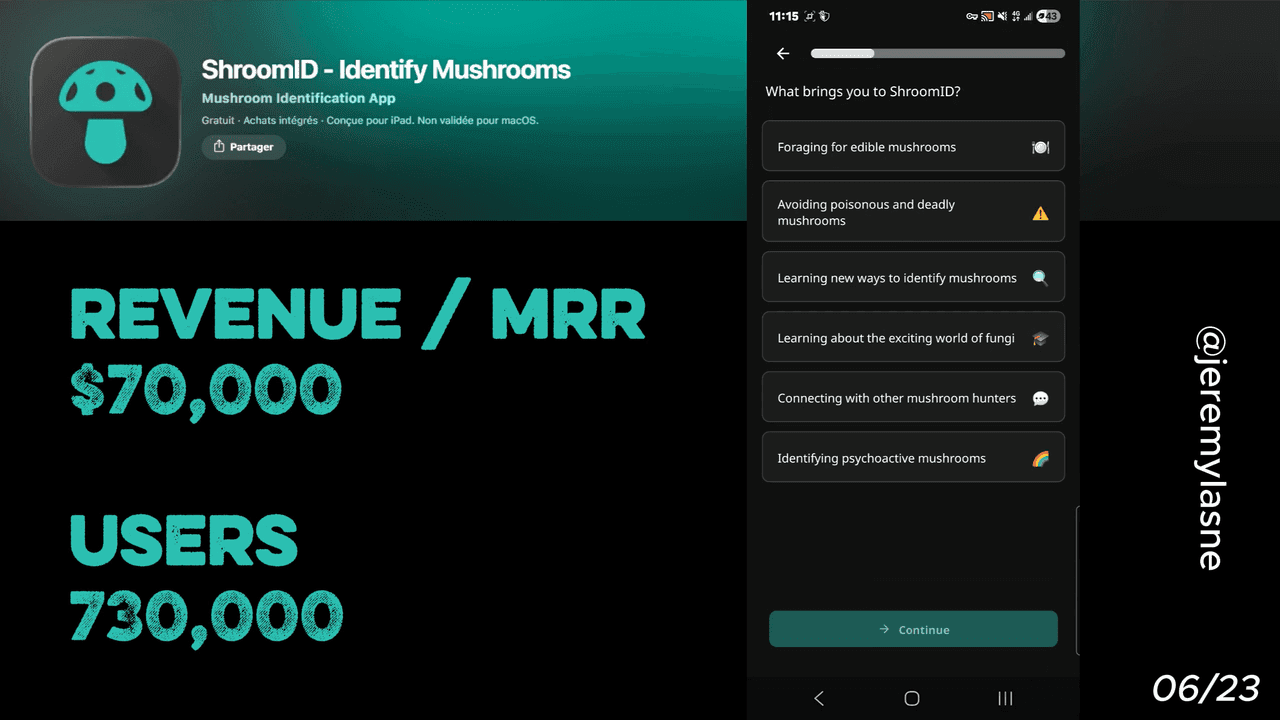
ShroomID is a mushroom identification app doing $70K MRR with 730K users. One core feature: take a photo, get an ID. Six screens before the paywall. The first screen is a liability disclaimer the user must actively agree to. That disclaimer is not legal protection, it is the most powerful conversion asset in the app. This article breaks down the full flow and why a niche single-feature app can out-monetize most general wellness apps per user.
Why ShroomID Is Worth Studying
Most founders building utility apps underestimate what niche stakes do to conversion. ShroomID is not a calorie tracker with 50 competing apps. It is not a habit tracker in a crowded wellness market. It is an app that answers one question (is this mushroom safe?) in a category where the wrong answer sends you to a hospital.
That context changes the entire economics of the business. Willingness to pay is not determined by features. It is determined by the cost of the alternative. For ShroomID users, the alternative to a correct ID is poisoning. Safety-first species data, clear edibility ratings, poisonous look-alike warnings, and handling notes, is what separates a serious foraging tool from a hiking companion.
$70K MRR. 730K users. Six screens of onboarding. Here is how it works.
The Numbers
The headline figures behind the teardown:
- MRR: $70K
- Total users: 730K
- Core feature: AI photo identification
- Onboarding screens before the paywall: 6
- Paywall: monthly + annual, classic structure
The Full ShroomID Onboarding Breakdown
Screen 1: The liability disclaimer, and why it converts
Before ShroomID shows you a feature, a mascot, a review count, or a single question, it shows you this:
"I agree and acknowledge that consuming and/or interacting with mushrooms may be dangerous to my health. I further assume all risk and accept sole responsibility for any injury or liability of any kind to myself or any third party in connection with my use of this app."
You must tap "I Agree" to continue.
Most founders read this and see legal protection. That is the wrong read. This disclaimer is the single most powerful conversion asset in the app, and here is why.
It does three things simultaneously. First, it establishes that mushroom identification is serious, not a game, not a curiosity tool, a skill with real stakes. Second, it makes the user feel the weight of what they are doing before they have seen a single screen of the product. Third, it creates the precise emotional state, "I need this to be accurate, I need to be careful, I am willing to pay for something reliable", that the paywall will close on six screens later.
The disclaimer primes every subsequent conversion decision. A user who has just agreed that this could affect their health is not the same user as one who downloaded a plant identifier for fun. They are already in a paying mindset. They just do not know it yet.
Picture Mushroom, ShroomID's main competitor, masterfully combines user education, a well-placed soft paywall, and crucial safety features to convert curious foragers into paying subscribers, proving that safety framing is the core conversion lever in this category.
Personalization: three targeted questions
After the disclaimer, ShroomID runs three personalization screens before the social ask. Each one is short, visual, and serves a dual purpose: it collects data and it deepens the user's sense that this app was built for their specific situation.
Screen 2: Experience level. Beginner. Casual forager. Experienced hunter. This question does not just segment the user for a personalized app experience. It makes the user articulate their own level of risk. A beginner who selects "beginner" is telling themselves they need help. That self-identification increases the perceived value of an accurate identification tool.
Screen 3: What do you forage for? Edible mushrooms. Medicinal fungi. Photography and curiosity. This question establishes intent. A user who picks edible mushrooms is the highest-risk user in the database, and therefore the most likely to pay. ShroomID's database covers each species' edible or toxic status and the characteristics that make it unique. Knowing which users are eating what they find allows the app to serve those users the most relevant safety information, and make the paywall feel most urgent to the people with the most at stake.
Screen 4: Where do you forage? Region and habitat type. This personalizes the species database shown to the user and sets up location-based features. It also does something subtler: it makes the user picture themselves in the field, phone in hand, unsure about a find. That mental simulation is the emotional context in which they will see the paywall.
Screen 5: Follow on social media
Mid-onboarding, before the benefits summary and before the paywall, ShroomID asks the user to follow them on Instagram.
This is an unusual ask at an unusual moment. Most apps bury the social follow in a post-onboarding email or a settings menu. Putting it in the flow, at a point when the user is engaged and has not yet seen a price, captures social follows at the highest possible intent moment.
The strategic value here is compounding. A social follow creates a second retention channel outside the app. Every post about a rare find, a species tip, or a community ID challenge is a re-engagement touchpoint that costs nothing after the follow. At 730K users, even a 10% follow rate is a meaningful community asset that feeds back into install growth.
It also does something for the paywall: a brand that has an active Instagram presence, with real foragers sharing real finds, feels more legitimate than a utility with no social proof. The follow ask primes the user to see ShroomID as a community, not just a tool.
Screen 6: Benefits summary
Before the paywall, one screen shows everything PRO unlocks. Unlimited identifications. Full species database. Toxic look-alike warnings. Offline access. Detailed habitat and seasonality data.
The sequencing is deliberate. The user has just: agreed that mushrooms can be dangerous, told the app they are a beginner (or an active edible forager), pictured themselves in the field needing an answer, and connected to the brand socially. Now they see a list of specific capabilities that address the specific risk they just acknowledged.
This is not a generic features list. It is a direct response to the fear the disclaimer installed on screen one.
The paywall: monthly and annual, clean structure
ShroomID offers in-app purchases ranging from $4.99 to $29.99 per item, covering both monthly and annual subscription options. The paywall presents both plans clearly. Annual is positioned as the value option. No gamification, no spin wheel, no countdown. Clean.
The absence of urgency tactics is itself a signal. ShroomID does not need manufactured scarcity. The stakes are real. A user who just spent six screens thinking about edible mushroom safety does not need a 24-hour countdown to feel urgency. The urgency exists in the use case. The paywall just needs to not get in the way.
The free tier remains functional for basic identification, but detailed safety information, look-alike warnings and handling notes, is what separates a serious foraging tool from a casual one, and that is precisely what lives behind the paywall.
The Core Mechanism
ShroomID's conversion architecture is the simplest in this entire teardown series, and arguably the most effective per screen.
Six screens. One mechanism: make the stakes real before you show the price.
The disclaimer does this on screen one. Every personalization question reinforces it. By the time the paywall appears, the user is not evaluating "is this app worth paying for?" They are answering a different question: "given that I am a beginner who wants to eat wild mushrooms and I just agreed this could hurt me, is $4.99/month a reasonable amount to spend on accuracy?"
That question answers itself.
This is the deepest lesson from ShroomID: the paywall conversion rate is determined before the paywall appears. Every screen before it is either building the case for paying or failing to. In ShroomID's case, six screens is enough because each one does real work on the user's perception of risk and reliability.
What This Means for Your App
One question: what is the actual cost of your app failing?
Most apps serve wants. ShroomID serves a need where the failure mode is poisoning. That asymmetry is not replicable in most categories. But the principle is.
What happens if your user does not track their calories accurately? What happens if their habit breaks? What happens if they miss the wrong notification? The more real and specific you make that failure scenario in the onboarding, the more your paywall closes itself.
ShroomID does not sell features. It sells protection from a specific bad outcome it named on screen one. If you can name the specific bad outcome your app protects against, and make the user feel it before they see a price, you have done the hardest part of conversion.
FAQ
How many screens does ShroomID's onboarding have before the paywall?
ShroomID shows 6 screens before the paywall: a liability disclaimer, three personalization questions covering experience level, foraging intent, and habitat, a social media follow ask, and a benefits summary screen.
What is ShroomID's revenue?
ShroomID does approximately $70K MRR as of June 2026 with 730K total users.
Why does ShroomID open with a liability disclaimer?
The disclaimer is both legal protection and a conversion mechanism. By forcing the user to acknowledge that mushroom consumption can be dangerous before any other screen, ShroomID primes the user's willingness to pay for accuracy. The disclaimer creates the fear; the paywall offers the solution.
What is ShroomID's paywall structure?
ShroomID offers monthly and annual subscription plans with pricing ranging from $4.99 to $29.99. The paywall appears after the 6-screen onboarding flow. There is no gamification or urgency tactic, the use case provides its own urgency.
What makes ShroomID's onboarding different from other nature apps?
Unlike general plant or wildlife apps, ShroomID's core use case has life-safety stakes. The entire onboarding is built around making those stakes visible before the paywall. The disclaimer, the edibility-focused personalization questions, and the benefits summary around safety features all serve the same conversion goal: make the user feel what is at risk before showing them what it costs to be protected.
What does ShroomID's free tier include?
ShroomID's free tier includes basic photo identification. Unlimited identifications, full species data, toxic look-alike warnings, offline access, and detailed habitat and seasonality information are behind the PRO subscription.
Why does ShroomID ask users to follow on social media during onboarding?
The social follow ask appears mid-onboarding at peak engagement, before friction. This captures social followers at the highest intent moment, when the user is actively interested and has not yet seen a paywall. A follow creates a free re-engagement channel outside the app for every subsequent post, ID tip, or community content piece.
This teardown is part of an ongoing series on in-app optimization. Want answers like these while you build? The tasu MCP serves the same sourced benchmarks to your coding agent, for onboarding, paywalls, and pricing.